PetDoing Originals · A little room for play
Pet Toy Room
爪爪玩具屋 · 在暖暖的客厅里,拨一下,撞个满怀。
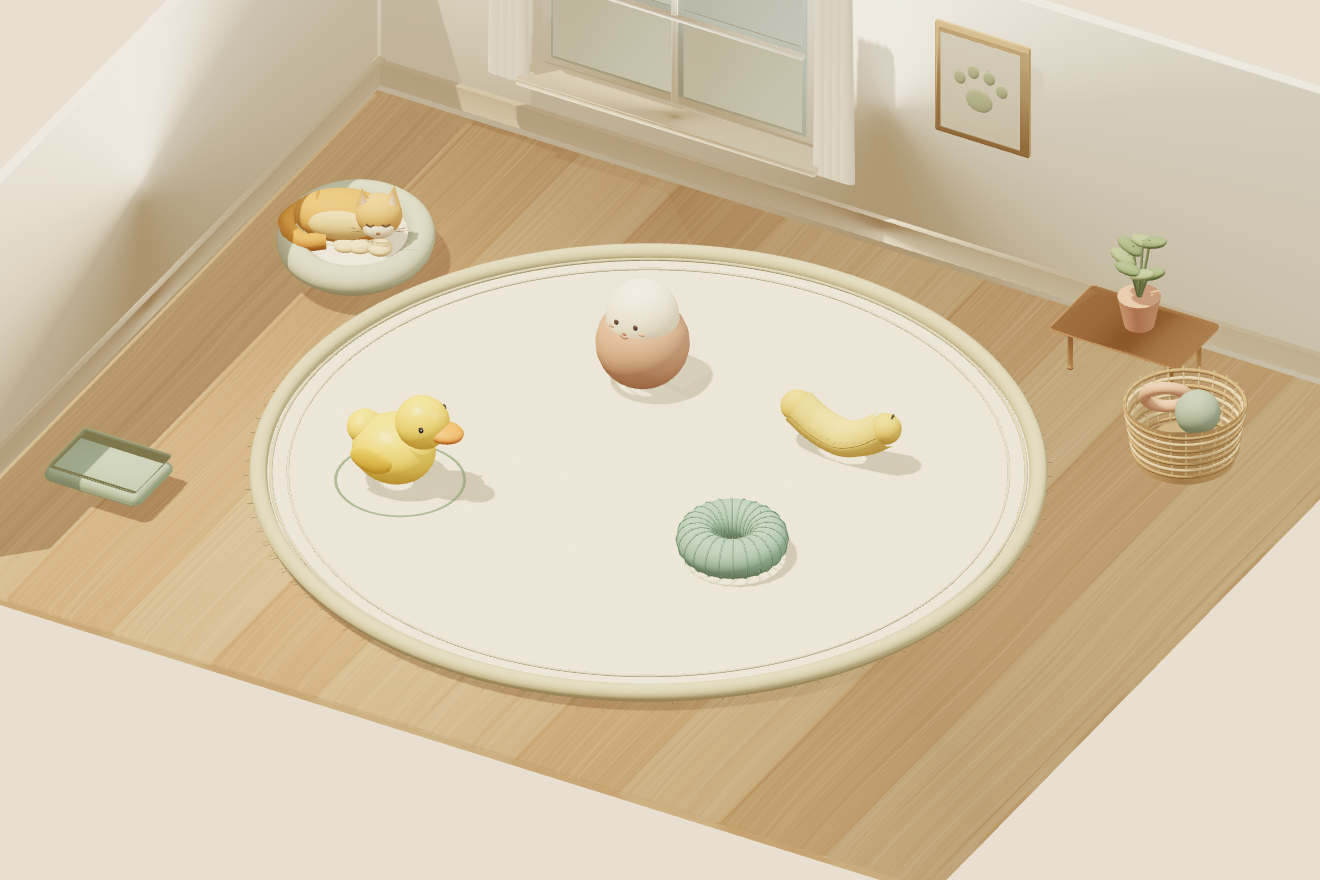
Settle into a small afternoon living room with four pet toys and Mango, our orange cat companion. Pull a toy back and release it across the rug. There is no opponent, countdown or level to finish: enjoy the bounce, the wobble and the quiet space between collisions.
Your first minute in the room
- Choose a toy. Four are already on the rug. Click or touch one to select it. A small ring underneath shows your selection, and the control panel names it.
- Pull back. Hold the toy and drag away from the direction you want it to travel. The arrow points toward the launch direction, and the power bar grows with the pull.
- Let go. Release inside the play area to nudge the toy. Try a short pull first. You can nudge again while toys are moving or after they have stopped.
- Make room for more. Click a toy card in “再拿一件出来?” to add another, up to eight at once. “收起这件玩具” removes your selection; “全部收起” clears the rug; “重新摆好” restores the original four and resets the collision count.
Four materials, four small experiments
Squeaky rubber duck · 发声小黄鸭. A rounded body and an offset head make the duck bob, bounce and sometimes land sideways. Turn sound on to hear its small squeak during a firm contact.
Mint chew ring · 薄荷咬圈. The ring is the springiest of the four. Send it across the rug and compare its rebounds with the duck. It can land flat or roll briefly on its rim.
Weighted wobbler · 摇摇不倒翁. A heavy lower center gives this egg-shaped toy its rocking return. Try a gentle push, then a stronger one, and watch it find its feet.
Banana plush · 香蕉小布偶. Higher friction and a softer bounce give the curved banana a slower, tumbling feel. Put one in the ring's path and watch how each responds.
These are stylized rigid-body simulations with a small visual squash effect. Rubber and fabric appearances do not mean the objects use a full soft-body simulation.
Play without dragging
Select a toy, adjust “拨动力度” (strength), choose a “方向” (direction), and press “轻轻拨一下” (nudge). The default direction aims toward the center of the rug. The left, right, forward and backward choices follow the screen view. You can also focus the play area with the keyboard and press Space to nudge the selected toy.
To cancel a drag, press Esc, right-click, release outside the play area or lift after a second finger touches the canvas. A short tap only selects. The rest of the page scrolls normally outside the canvas.
Make it your kind of quiet
Sound starts off. Choose “声音 关” to enable the soft synthesized contact sounds and duck squeaks; choose it again to mute. “暂停” pauses the room, and “继续玩” resumes it. Switching to another tab also pauses play. Your system's reduced-motion preference turns off decorative cat motion and toy squash while keeping the physics playable.
The small collision counter counts toy-to-toy impacts, not every floor bounce. It is a session curiosity, with no score target, reward or leaderboard. Mango watches and reacts but does not move toys for you.
中文快速上手
点中玩具,按住后往出手方向的反方向拖动,松手拨出。也可以直接调节力度和方向,再点“轻轻拨一下”。四种玩具可以重复添加,最多八件,随时收起或重新摆好。
小黄鸭轻快,咬圈更弹,不倒翁会慢慢站稳,香蕉布偶容易翻滚。没有输赢、倒计时或通关要求。声音默认关闭,想听吱吱声可以手动开启。拖到场地外松手、按 Esc 或用第二根手指触碰场地,都能取消这次拖动。
Three things to try
Keep the strength the same. Use the button controls to send the duck and ring in the same direction with a medium push. Watch the difference after their first contact with the rug edge.
Build a small meeting point. Gently nudge toys toward the center, then send one more through the group. A glancing contact often turns a toy more than a direct hit.
Wait for the wobbler. Clear the room, add just the wobbler and push it gently. Watching it settle is part of the play; there is no need to keep clicking.
Browser support and progress
Use a current browser with WebGL and WebAssembly enabled. The 3D physics engine makes the first download larger than a text page. If the room does not appear, refresh once and check browser hardware acceleration. A narrow screen places the control panel and toy basket below the room.
Responsive desktop and narrow-screen layouts are checked in Chrome. Actual Android and iPhone touch feel still needs device testing. This release uses mouse, touch and buttons, without motion-sensor control.
The simulation runs locally in your browser, makes no gameplay account requests and does not save game progress. Leaving or refreshing starts a new room. There are no purchases, prizes or cash rewards.
About this room
PetDoing adapted its independently developed spinning-object physics prototype into this pet-themed free-play room. The toys, furniture and Mango are built from 3D geometry, with procedural wood and woven textures. The picture above is captured from the actual game. This is an on-screen activity for people; it is not a test of real pet toy safety.